
Display
Display
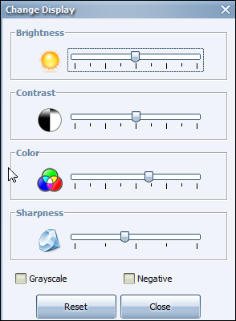
The Display settings affect the visual quality of your video. Click the Display icon. The Change Display dialog appears.
To adjust the brightness, contrast, color, and sharpness of your video, move the sliders left or right.
Check the Grayscale checkbox to set the video to appear in black and white.
Check the Negative checkbox to set the video to appear in inverted colors.
Press Reset to return to the display default settings.
Visit us online at www.synecticsglobal.com
Copyright 2025© Synectic Systems Group Limited. All rights reserved.
Comments
0 comments
Please sign in to leave a comment.