The Interlace Settings control how a video image is displayed on your monitor. Changing these settings allows you to correct motion-related blurriness.
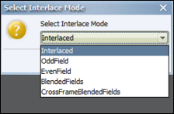
Click the Interlace Settings button on the Video menu. The Select Interlace Mode dialog appears.
Make a selection from the Select Interface Mode drop-down menu.
Interlace Mode
Description
Interlaced
Scenes with little or no motion will appear sharp. Scenes with high levels of motion will show signs of blurring; in this case, select another mode.
OddField
The image resolution will decrease, but the blurring will disappear.
EvenField
The image resolution will decrease, but the blurring will disappear.
BlendedFields
Synergy will mathematically blend the video fields to try to retain the resolution while removing the blurring.
CrossFrame
BlendedFields
Synergy will mathematically blend the video fields to try to retain the resolution while removing the blurring.

Comments
0 comments
Please sign in to leave a comment.